Controls
Use the left mouse button to play the game, and drag the right mouse button or use WASD to move the camera view.
Use the left mouse button to play the game, and drag the right mouse button or use WASD to move the camera view.
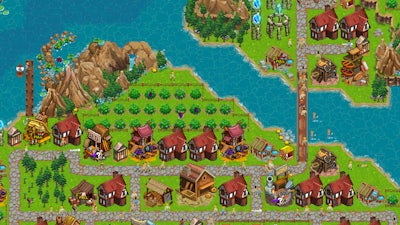


Pokid drops a fresh take on idle simulation with City Idle. Start with a single firepit, watch a handful of curious villagers appear, and watch that spark turn into a sprawling metropolis. The game’s top‑down view puts every street, hut, and tower in plain sight, so you always know what’s happening. It’s not just about tapping; it’s about shaping a living, breathing civilization that reacts to every decision you make. If you love building, growing, and mastering complex systems, this is the place to prove your mettle.
The control scheme is stripped down to the essentials. One click, one drag, and you’re in full command. The left mouse button handles all interactions, while the right mouse button or WASD keys let you pan across the map. No clutter, no tutorials that stall the fun.
Success hinges on smart placement and timing. Begin by clustering basic huts around your firepit; this boosts early citizen morale and speeds up resource gathering. As the population grows, diversify your building types—farms, workshops, and research labs each unlock new layers of the simulation. Prioritize research that reduces construction costs; cheaper building means faster expansion. Keep an eye on traffic flow: a congested road network slows down resource transport and hurts overall management efficiency. Use the top‑down perspective to spot bottlenecks and re‑route citizens with pathways or bridges. Remember, idle doesn’t mean idle. Periodically check the tech tree, invest in upgrades, and watch your city evolve from a humble camp to a thriving empire.
Ready to put your city‑building instincts to the test? Dive into City Idle now, and watch how quickly a single firepit can blossom into a legend. Pokid’s latest simulation awaits—start growing your civilization today.
Use the left mouse button to play the game, and drag the right mouse button or use WASD to move the camera view.