Click to play
x
Controls
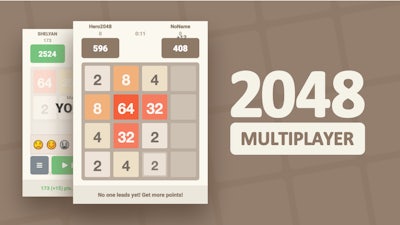
2048 Multiplayer















Click to play
This game is not available on mobile.

Classic 2048 gets a competitive twist that makes every swipe feel like a showdown. Play the same addictive number‑stacking puzzle, but now you’re matching tiles with friends in real‑time. The rush of hitting 2048 while your opponent races to do the same creates a skill‑driven, edge‑of‑your‑seat experience you won’t find in the solo version.
Controls are razor‑sharp and simple: use WASD or arrow keys on PC, or swipe on mobile, to push all tiles in one direction. Every move merges equal numbers, doubles your score, and fuels the race to the top.
Winning isn’t just about random swipes; it’s a test of foresight and timing. Keep the highest tile in a corner to preserve space, and force your opponent into cramped grids with strategic pushes. Master the “snake” pattern to maximize merge opportunities while maintaining speed. As the match progresses, the board fills faster – the key is to anticipate where new tiles will appear and cut off your rival’s combos. Each victory awards skill points that unlock visual themes and faster tile spawn rates, turning every round into a fresh challenge.
Ready to prove your puzzle prowess? Jump into 2048 Multiplayer on Pokid’s platform and start battling instantly. Whether you’re grinding solo for high scores or challenging a crew with friends, the arena is live 24/7. Join the community, sharpen your skill, and watch your rank climb. Pokid delivers the smoothest multiplayer experience – hit the board, feel the speed, and claim the 2048 crown today.





















