SIX FOLD: The 3D Snake that Rolls on Paper
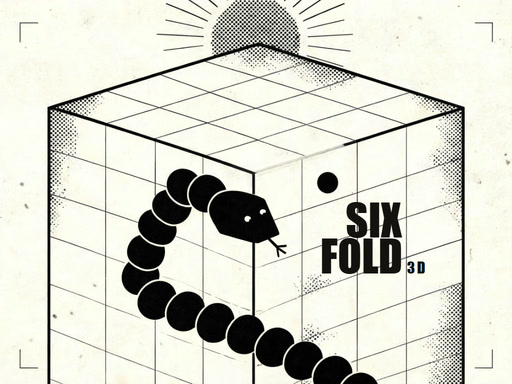
You step onto a paper cube and guide a single ink line. Every bite you take adds a link and pushes you faster. The cube rolls when you cross an edge, turning the panel beneath you into a wall. There’s no floor and no finish line—only your own line can stop you. If you bite yourself, the run ends and you try again. Score by counting links eaten; record the best run. Three starting speeds—CALM, BRISK, FERAL—test your reflexes and precision. This is the 3D Snake that keeps you chasing your own shadow.
SIX FOLD Controls
Move the line with the most common input methods. On desktop, use arrow keys or WASD. On a touch device, swipe to turn. The game ends when the line crosses itself. The HUD gives quick options: pause, mute, or end the run with the END key. Press P or ESC to resume. M toggles mute. Press ENTER or R to start a new line. The controls stay minimal so you can focus on the pattern.
- Keyboard, touch, and pointer controls
- Arrow keys or WASD turn the line one way at a time
- Swipe on a touch screen
- The run ends when the line crosses itself
- HUD keys pause, mute, and END end this run
- P or ESC resumes
- M mutes
- ENTER or R starts a new line
SIX FOLD Strategy Tips
Mastering the cube’s geometry is key. Each face is a separate corridor; when you roll, the next face becomes a wall. Plan your path ahead of time by visualizing the cube’s rotation. Keep the line short early on to avoid accidental self‑intersections. As the speed ramps up, use the tightest loops you can create. The fastest runs come from tight spirals that consume links without crossing. When you hit a corner, pause briefly to adjust your angle; the pause key gives you a moment to reset your mind. Remember that every link adds speed—so the longer you survive, the harder it gets. Use the mute button to focus on the rhythm of the game; background noise can throw off your timing. Keep an eye on the HUD to know when you’re approaching the end of a run. When you hit the END key, the game resets, so use it strategically to break a bad pattern.
In multiplayer mode, the 1 Player version feels like a solo marathon, but the 3D environment adds depth. The snake’s path can twist around the cube, creating a labyrinth that only you can
Keyboard touch and pointer Arrow keys or WASD turn the line one way at a time swipe on a touch screen The run ends when the line crosses itself HUD keys pause mute and END end this run P or ESC resumes M mutes ENTER or R starts a new line The